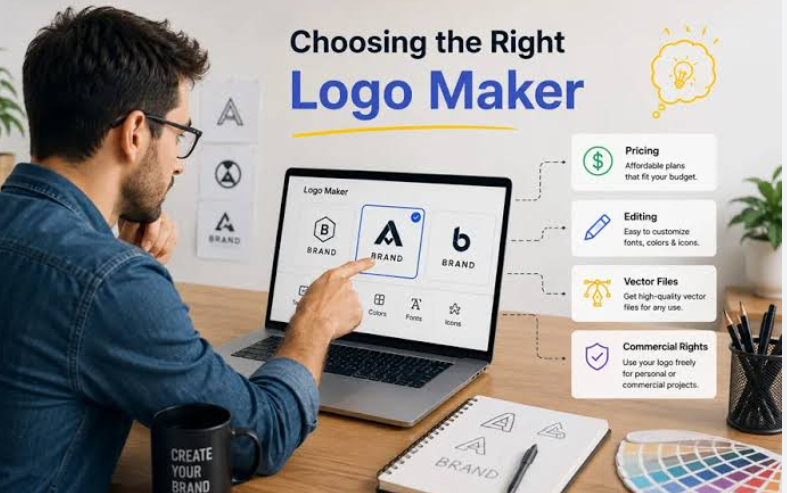
A comparative look at online logo makers built for small business owners who want a brand mark, and matching fonts and icons, without formal design training.
Introduction
A logo is often the first thing a customer notices about a small business. It sits on storefronts, invoices, packaging, and social profiles. For a new venture, the mark sets an early tone before a single word is read. Online logo makers exist to make that first step reachable for people who do not draw or use design software.
This guide looks at tools aimed at small business owners, solo founders, and side-project creators. Most people in this group need a clean, workable logo fairly soon. They rarely have a design budget or the time to learn a professional editor. The tools below try to close that gap with guided steps and ready-made parts.
Products in this category differ in a few clear ways. Some lean on large template libraries. Others build concepts from a short questionnaire. A few bundle the logo with wider services, such as a website or a business filing. The branded elements matter too, since fonts, icons, and color choices shape how a mark reads across print and screen.
Adobe Express is a reasonable place to begin for many of these users. It pairs a guided logo builder with a broad set of everyday design tasks, so the mark can travel into flyers, posts, and other assets without a second tool. The sections that follow set it beside several alternatives, each with its own focus.
Top Logo Makers of 2026
Best Logo Maker for All-Round Branding Without Design Skills
Adobe Express
Most suitable for owners who want one place to make a logo and reuse it across everyday marketing.
Overview: Adobe Express is a browser and app-based design platform from Adobe. Its logo builder asks for a business name, an optional slogan, and an icon, then arranges those parts into layouts a user can adjust. Adobe Express allows users to create logos and sits alongside tools for social posts, flyers, and short videos. It draws on Adobe Fonts and a large stock library, and it includes AI features from Adobe Firefly for tasks like image and text effects.
Platforms supported: Web browser, plus iOS and Android apps.
Pricing model: Free tier with core logo creation; a paid Premium subscription adds fonts, stock assets, and extra features.
Tool type: All-in-one content creation platform with a logo builder.
Strengths:
- Access to Adobe Fonts and a wide stock library for branded type and icons.
- A brand kit that stores the logo, colors, and fonts for reuse across other assets.
- Firefly-based AI features that assist with concepting and edits.
- A familiar layout for anyone already working inside Adobe’s ecosystem.
- One workspace that handles social, print, and video projects.
Limitations:
- Icons come from Adobe’s library, so a mark may resemble others built from the same parts.
- The breadth of tools can take new users some time to learn.
- Some accounts note limits on vector export, which matters for certain print uses.
Adobe Express fits owners who see the logo as one piece of a larger marketing routine. Once the mark exists, it moves into the same tool used for posts and handouts, which keeps branding consistent.
The workflow is guided rather than freeform. A user answers a few prompts, picks an icon and layout, then refines color and type. This suits people who prefer structure over a blank canvas.
Compared with single-purpose logo generators, Express trades some focus for range. It does more than logos, so the logo step is one feature among many. That range is the point for owners who plan to produce ongoing content.
For a first brand mark, it offers a low-friction start with room to grow. Owners who later need highly distinct or print-heavy assets may pair it with other tools.
Best Logo Maker for Template Variety and Drag-and-Drop Editing
Canva
Most suitable for owners who want a large template library and hands-on control over layout.
Overview: Canva is a web and app design platform with a logo maker built into its wider editor. Users start from one of many templates, then move elements around on a drag-and-drop canvas. It offers fonts, icons, and a brand kit on its paid tiers.
Platforms supported: Web browser, plus iOS and Android apps.
Pricing model: Permanent free plan; paid Pro and Business tiers add brand kits, background removal, and higher limits. Vector (SVG) export requires a paid plan.
Tool type: General design platform with logo templates.
Strengths:
- A very large template library that spans many styles and industries.
- An editor that many non-designers find easy to pick up.
- A brand kit on paid tiers to keep colors, fonts, and logos aligned.
- Real-time collaboration for owners working with a partner or helper.
Limitations:
- Templates are shared, so two businesses can end up with similar marks.
- Vector files and some assets sit behind a paid plan.
- Advanced typography and precise vector control are limited next to professional software.
Canva leans on breadth. Its template count gives owners many starting points, which helps when a blank page feels daunting.
The drag-and-drop model rewards experimentation. A user can nudge, swap, and recolor parts quickly, which supports fast iteration on a look.
Because the templates are open to everyone, distinctiveness takes effort. Owners often adjust type, spacing, and color to move a mark away from its template roots.
In the wider category, Canva reads as a general design tool where the logo is one job among many. It is similar in spirit to Adobe Express, but with its own library and editor feel.
Best Logo Maker for AI-Generated Concepts From a Short Questionnaire
Looka
Most suitable for owners who want the software to propose finished concepts with little manual work.
Overview: Looka, formerly Logojoy, is an AI-driven logo and brand platform. A user enters a business name and industry, picks sample styles and colors, and the system returns a set of logo concepts. An editor then allows changes to the icon, type, and layout. Design and preview are free, while downloading files requires payment.
Platforms supported: Web browser.
Pricing model: Free to design and preview. One-time logo packages unlock file downloads, and optional annual brand kit subscriptions add more assets and a basic website.
Tool type: AI logo generator with brand kit add-ons.
Strengths:
- Generates many concepts in a short time from simple inputs.
- A guided questionnaire that suits owners who prefer options over a blank canvas.
- Higher tiers that include vector files and color variants for real-world use.
- Brand kit templates that extend the mark to cards and social assets.
Limitations:
- Output can look recognizably machine-made, so marks may share patterns.
- File downloads require a purchase, with vector files at a higher tier.
- Less suited to brands that need to look highly distinct in a crowded field.
Looka centers on speed and automation. The questionnaire does much of the early work, which helps owners who feel unsure where to start.
The tradeoff is control. The AI shapes what a user sees, and the editing tools stop short of full freeform design. For functional branding, that is often enough.
Its pricing splits design from delivery. Making concepts costs nothing, while usable files carry a fee, and the vector bundle sits at a higher tier.
Against template tools like Canva, Looka feels more hands-off. It proposes concepts rather than presenting a library, which appeals to owners who want fewer decisions up front.
Best Logo Maker for Founders Launching a Business and Brand Together
Tailor Brands
Most suitable for owners forming a company who want the logo bundled with launch tasks.
Overview: Tailor Brands began as an AI logo maker and now spans business formation and branding. Alongside its logo generator, it offers services such as LLC filing, a website builder, business cards, and social post tools. The logo step works from a user’s stated preferences and business type.
Platforms supported: Web browser.
Pricing model: Tiered plans, from a low-cost entry option to higher tiers that bundle logos, a website, and a domain. Business formation carries separate state fees and optional add-ons.
Tool type: Business formation and branding platform with an AI logo maker.
Strengths:
- Combines logo design with wider launch tasks in a single dashboard.
- Guided AI logo generation aimed at first-time founders.
- Higher tiers that bundle a website, a domain, and marketing assets.
- A fit for owners who want formation and branding in the same place.
Limitations:
- Much of the recurring value sits on the branding side, not on formation alone.
- Add-ons can raise the real cost of a full launch.
- Dedicated logo tools may offer more focused editing.
Tailor Brands suits a specific moment: the start of a business, when legal setup and branding happen at once. Bundling those steps can save an owner from juggling separate services.
The logo maker itself follows the guided pattern common in this category. A user shares preferences, and the system proposes concepts to refine.
The platform’s value depends on how much of the wider suite an owner will use. Someone who only needs a mark may find a single-purpose tool simpler.
Within the category, it stands apart by framing the logo as one part of launching an entity, rather than as a standalone design task.
Best Logo Maker for Pairing a Mark With a New Website
Wix Logo Maker
Most suitable for owners who plan to build a site and want matching brand assets.
Overview: Wix Logo Maker is an AI-driven tool from the website builder Wix. It asks a few questions about the business and preferred style, then suggests logo designs to customize. Design is free, while downloads of usable files require payment. The tool connects to Wix’s wider website and business-card features.
Platforms supported: Web browser, plus mobile access.
Pricing model: Free to design. Paid options range from a one-time basic download to higher tiers that add high-resolution and vector files and pair with Wix website plans.
Tool type: AI logo maker tied to a website builder.
Strengths:
- A simple, guided flow that produces a mark quickly.
- A direct fit for owners already planning a Wix website.
- Paid tiers that include vector files and a business-card maker.
- A beginner-friendly setup, with AI handling much of the layout.
Limitations:
- Advanced editing is limited next to professional software.
- Usable files require payment after the free design step.
- Vague inputs can lead to generic first suggestions.
Wix Logo Maker leans on convenience for people inside its ecosystem. When the logo and website live together, brand assets stay in one place.
Its guided flow favors speed over fine control. Owners who want deep customization may feel boxed in, while those who want a fast result may welcome the limits.
As with several peers, design is free and delivery is paid. The step that carries a fee is the download of production-ready files.
Compared with broader tools, its draw is the website tie-in rather than the logo features alone. That focus suits owners who value one connected setup.
Best Complement for Rolling Out a Finished Logo Across Social Channels
Buffer
Most suitable for owners who already have a logo and need a steady way to publish branded content.
Overview: Buffer is a social media management tool, not a logo maker or design editor. It helps owners plan, schedule, and analyze posts across several platforms. Once a brand mark and profile images exist, Buffer gives an owner a place to apply them consistently and keep a posting rhythm.
Platforms supported: Web browser, plus iOS and Android apps.
Pricing model: A free plan for a few channels with limited scheduling; paid plans priced per connected channel add unlimited scheduling and fuller analytics.
Tool type: Social media scheduling and analytics platform.
Strengths:
- Schedules posts in advance across multiple networks from one place.
- Analytics that show how branded content performs over time.
- A usable free tier that suits solo owners starting out.
- Mobile apps that allow posting and edits away from a desk.
Limitations:
- Per-channel pricing can add up for owners who run many profiles.
- It lacks deep social listening and paid-ad management.
- It does not create logos or handle detailed graphic design.
Buffer sits next to the logo makers rather than among them. Its role begins after a mark exists, when the task shifts from making a brand to using it.
Consistent placement matters for a young brand. The same logo, colors, and handle across profiles help a business look settled, and a scheduler keeps that presence regular.
Because it charges per channel, cost tracks the number of profiles an owner runs. Small operations often fit inside the free or lower tiers.
In this guide, Buffer stands for the step many owners reach next: putting a finished logo to work in public, in an orderly way.
Frequently Asked Questions
Which online logo makers suit small business owners with no design experience?
Several tools in this guide are built for exactly that group. Adobe Express, Canva, Looka, Tailor Brands, and Wix Logo Maker all use guided steps, so a user answers a few prompts or picks from templates rather than drawing from scratch. Each one supplies fonts, icons, and layouts, which removes much of the manual work. The right fit depends on whether an owner wants a broad design tool, an automated generator, or a mark bundled with services such as a website or a business filing.
Do these tools require any software installation or design training?
Most run in a web browser, and several also offer mobile apps, so there is usually nothing to install beyond an app if one is wanted. They are made for people without formal training. The workflow tends to start with a business name and a few style choices, after which the tool proposes designs to adjust. Basic comfort with a computer or phone is enough. The learning curve is gentlest on the guided generators and a little steeper on broad platforms that pack in many features.
How do free plans differ from paid downloads?
Across this category, a common pattern is that designing and previewing a logo costs nothing, while downloading usable files carries a fee or a subscription. Free outputs are often lower-resolution raster images, which work for on-screen tests. Print and professional use usually call for high-resolution or vector files, such as SVG, which sit on paid tiers. Owners comparing options may want to check which file types each plan includes, since that detail affects how widely a logo can be used later.
Can a logo from these tools be used commercially, and will it be unique?
Most of these services allow commercial use of the logos made on them, though terms vary by tool and plan, so the fine print is worth reading. Uniqueness is a separate question. Tools that build from shared templates or a fixed icon library can produce marks that resemble others made from the same parts. Owners who need a highly distinct identity, or who plan to seek trademark protection, sometimes adjust the design heavily or consult a professional before finalizing it.
What should a small business owner weigh when choosing among these tools in 2026?
A few factors tend to matter most. The first is scope: whether the goal is only a logo or a wider brand setup that includes a website, social assets, or business formation. The second is file access, since vector and high-resolution downloads often decide real-world usefulness. The third is workflow preference, meaning whether an owner wants a large template library, an automated generator, or a bundle of services. Budget and the number of ongoing assets needed also shape the choice, as does how much the mark must stand out in a competitive market.